OPSPILOT

A co-pilot that never touches the controls

It reads the session with you, works out what broke, and writes the next command out in full — then waits. Flying the aircraft stays your job, and there is no setting that changes that.

An AI-powered terminal, for the infrastructure AI normally cannot reach.

A terminal, a file manager, a remote desktop client and an AI assistant in one window. Secrets are stripped on your machine before anything is sent, and what comes back is an explanation and a proposal — never an executed command.
One window, ten ways in

  • SSH
  • Telnet
  • RSH
  • Mosh
  • RDP
  • VNC
  • FTP/SFTP
  • AWS S3
  • Serial
  • Local shell
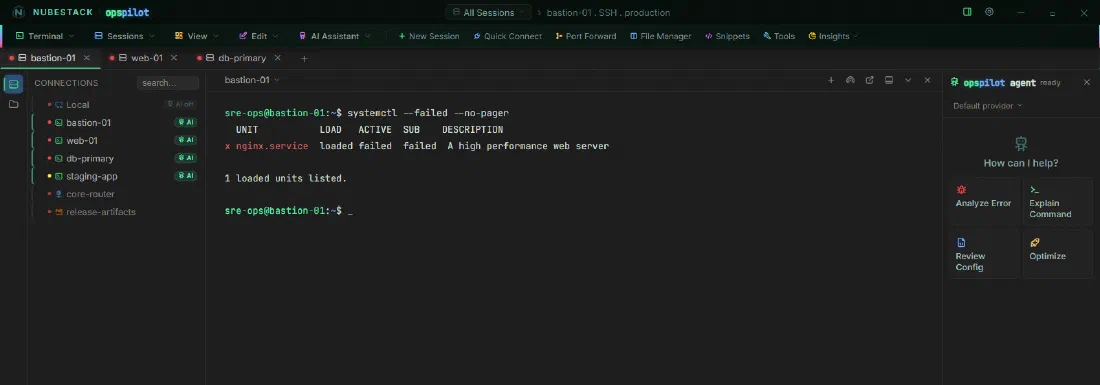
The OpsPilot workspace: saved connections on the left, a live SSH session in the centre, the AI panel on the right

Two inversions

Everything else assumes the opposite of what your estate actually is

What the rest assume

  • The machine you’re working on can reach the internet
  • Giving the model a shell is the point
  • An agent gets installed on every host
  • Regulated estates are somebody else’s problem

What OpsPilot assumes

  • Only your workstation needs a route out — with a local model, not even that
  • The model proposes. You execute
  • Nothing is installed. If you can SSH to it today, you’re done
  • Banking, defence, healthcare and air-gapped networks are the point
YOUR WORKSTATIONDISCONNECTED / VPN-ONLY NETWORKOpsPilotbastion-01db-primaryweb-01core-routerno internetno agent, no daemonno proxy exceptionnothing installed on the hostsSSH · RDP · VNCover VPNredacted text onlyYour AI provideror a local model, and nothing leavesthe servers never call out

OpsPilot runs on the one machine that already touches both sides. The servers make no outbound call and never learn an AI was involved.

The execution boundary

The AI is never given a shell

Every proposal lands in one of three tiers, and turning one into a real command takes a click you make.
  • Read-only Runs on its own, if you’ve turned that on. Off by default.
  • Low risk One explicit click, every time.
  • High risk A typed written justification, then the click.

Your own pattern list can promote a command to dangerous. Nothing can demote one the model already flagged.
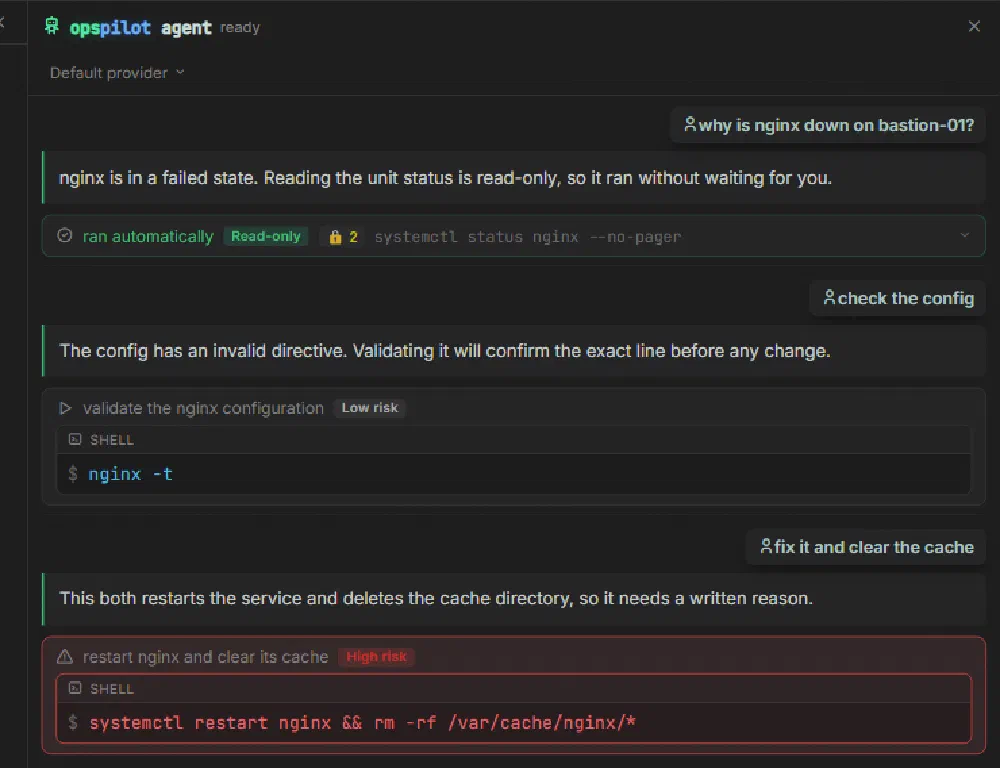
Three proposed commands in the OpsPilot AI panel, tagged read-only, low risk and high risk

What leaves the machine

Secrets are removed before anything is sent

Redaction runs locally, on the single path between the terminal and the AI.
  • Ten redaction categoriesKeys, tokens and passwords always. Hostnames, IPs and emails when you want them — strict in production, relaxed in the lab.
  • Ten AI providers, including a local oneClaude, ChatGPT, Copilot, Gemini and the rest — or Ollama on your own machine, and nothing leaves it.
  • Use the subscription you already pay forConnect Claude, ChatGPT or Copilot directly. A command proposed there hits exactly the same gate.
  • Operate it from your phoneYour workstation stays on the VPN. You don’t. Approval still waits at the desk.

Plans

One price, every feature

Trial

Free · 15 days

Install it and start working. No card, no quote, no sales call.

  • The complete product
  • AI on 2 sessions at a time
  • Up to 10 concurrent sessions
  • Every connection type

Windows, macOS and Linux, built from the same codebase. When a trial ends the terminal keeps working — only the AI layer switches off, and your profiles are waiting when you subscribe. Inference is billed by whichever provider you choose, and a local model makes that nothing.

Common questions

Worth asking early

No. No agent, no daemon, no outbound firewall rule. OpsPilot connects the way you already do, from a workstation that already reaches both sides.
Yes, with a local model. Point it at Ollama or a self-hosted endpoint and nothing leaves the machine — the interface ships every font and icon locally and never calls a CDN.
It has no way to run anything. A proposal becomes a command only through your click, and a destructive one needs a written reason first.
Only the provider you configured, and only after local redaction. There is no cloud backend, no account system and no sync service.

Documentation

Everything, written down

Install, connections, the AI layer, the safety model and the full reference tables — a complete user and product manual.
Open the documentation

Fifteen days, the whole product, no card

Install it, point it at something genuinely broken, and see whether the diagnosis is worth having.